---
title: Antrum Central Air Monitoring
description: With Antrum, you don't have to exchange energy efficiency for clean air. Our central air monitoring system ensures peak airflow when needed and conserves energy when it's not.
image: https://antrum.com/hubfs/Sensor%20Pack.webp
---

[Skip to main content](https://antrum.com/technology/antrumeye#main-content)

[![Antrum a\_mark\_logo\_2color white](https://antrum.com/hubfs/Antrum%20a_mark_logo_2color%20white.svg)](https://antrum.com?hsLang=en)

- Show submenu for PRODUCTS PRODUCTS 
  
    - [AntrumX](https://antrum.com/antrumx)
    - [AntrumEYE](https://antrum.com/technology/antrumeye)
    - [Sensor Pack](https://antrum.com/sensorpack)
- Show submenu for SPACES SPACES 
  
    - [General Occupancy](https://antrum.com/general-occupancy)
    - [Healthcare](https://antrum.com/healthcare)
    - [Laboratories](https://antrum.com/laboratories)
    - [Universities](https://antrum.com/universities)
    - [Vivariums](https://antrum.com/vivariums)
- Show submenu for RESOURCES RESOURCES 
  
    - [AntrumX vs Aircuity](https://antrum.com/compare/antrum-vs-aircuity)
    - [Case Studies](https://antrum.com/case-studies)
    - [LVDL Selector](https://antrum.com/resources/lvdl-selector)
    - [DCV Payback Calculator](https://antrum.com/resources/dcv-payback-calculator)
    - [Specify](https://antrum.com/resources/specify)
    - [Install](https://antrum.com/resources/install)
    - [Experience](https://antrum.com/resources/experience)
    - [News](https://info.antrum.com/en)
    - [FAQ](https://antrum.com/faq)
- [CONTACT](https://antrum.com/contact)

Open main navigation

Close main navigation

- Show submenu for PRODUCTS PRODUCTS 
  
    - PRODUCTS
    - [AntrumX](https://antrum.com/antrumx)
    - [AntrumEYE](https://antrum.com/technology/antrumeye)
    - [Sensor Pack](https://antrum.com/sensorpack)
- Show submenu for SPACES SPACES 
  
    - SPACES
    - [General Occupancy](https://antrum.com/general-occupancy)
    - [Healthcare](https://antrum.com/healthcare)
    - [Laboratories](https://antrum.com/laboratories)
    - [Universities](https://antrum.com/universities)
    - [Vivariums](https://antrum.com/vivariums)
- Show submenu for RESOURCES RESOURCES 
  
    - RESOURCES
    - [AntrumX vs Aircuity](https://antrum.com/compare/antrum-vs-aircuity)
    - [Case Studies](https://antrum.com/case-studies)
    - [LVDL Selector](https://antrum.com/resources/lvdl-selector)
    - [DCV Payback Calculator](https://antrum.com/resources/dcv-payback-calculator)
    - [Specify](https://antrum.com/resources/specify)
    - [Install](https://antrum.com/resources/install)
    - [Experience](https://antrum.com/resources/experience)
    - [News](https://info.antrum.com/en)
    - [FAQ](https://antrum.com/faq)
- [CONTACT](https://antrum.com/contact)
- [Schedule a Demo](https://antrum.com/schedule-a-demo)

[Schedule a Demo](https://antrum.com/schedule-a-demo?hsLang=en)

# antrumEYE®

A platform designed for facilities leaders to monitor and analyze building ventilation systems quickly and efficiently, identifying energy-saving opportunities along the way. The platform streamlines the collection, visualization, and interpretation of ventilation data. By providing actionable insights, end-users can optimize ventilation performance and reduce energy consumption.

[Watch a Demo](https://www.youtube.com/playlist?list=PLOBIWdLWaLqkKawSTrxFlzctnC6_zmIBT)

![](https://antrum.com/hubfs/antrumEYE%20tech%20page/Adobe%20Express%20-%20file%20(5)-1.png)

![](https://antrum.com/hubfs/raw_assets/public/sr-child-theme-antrum/images/tab-notch-thingy.svg)

## Unlock efficiency from your existing infrastructure

Learn how antrumEYE can benefit your facility by developing baseline data on your current ventilation performance, identifying energy-saving opportunities without the need for major infrastructure changes, and providing clean, structured datasets that can be used for external analysis. With antrumEYE, you gain actionable insights that improve efficiency, sustainability, and decision-making — all from the systems you already have in place.

### [Overview](https://antrum.com/hubfs/Website%20Filestore/Technology%20-%20antrumEYE/AntrumEYE_Cutsheet.pdf?hsLang=en)

### [How it Works](https://antrum.com/hubfs/antrumEYE%20tech%20page/antrumEYE%20Experience-1.pdf?hsLang=en)

![last one](https://antrum.com/hs-fs/hubfs/last%20one.png?width=1852&height=1672&name=last%20one.png)

## Components

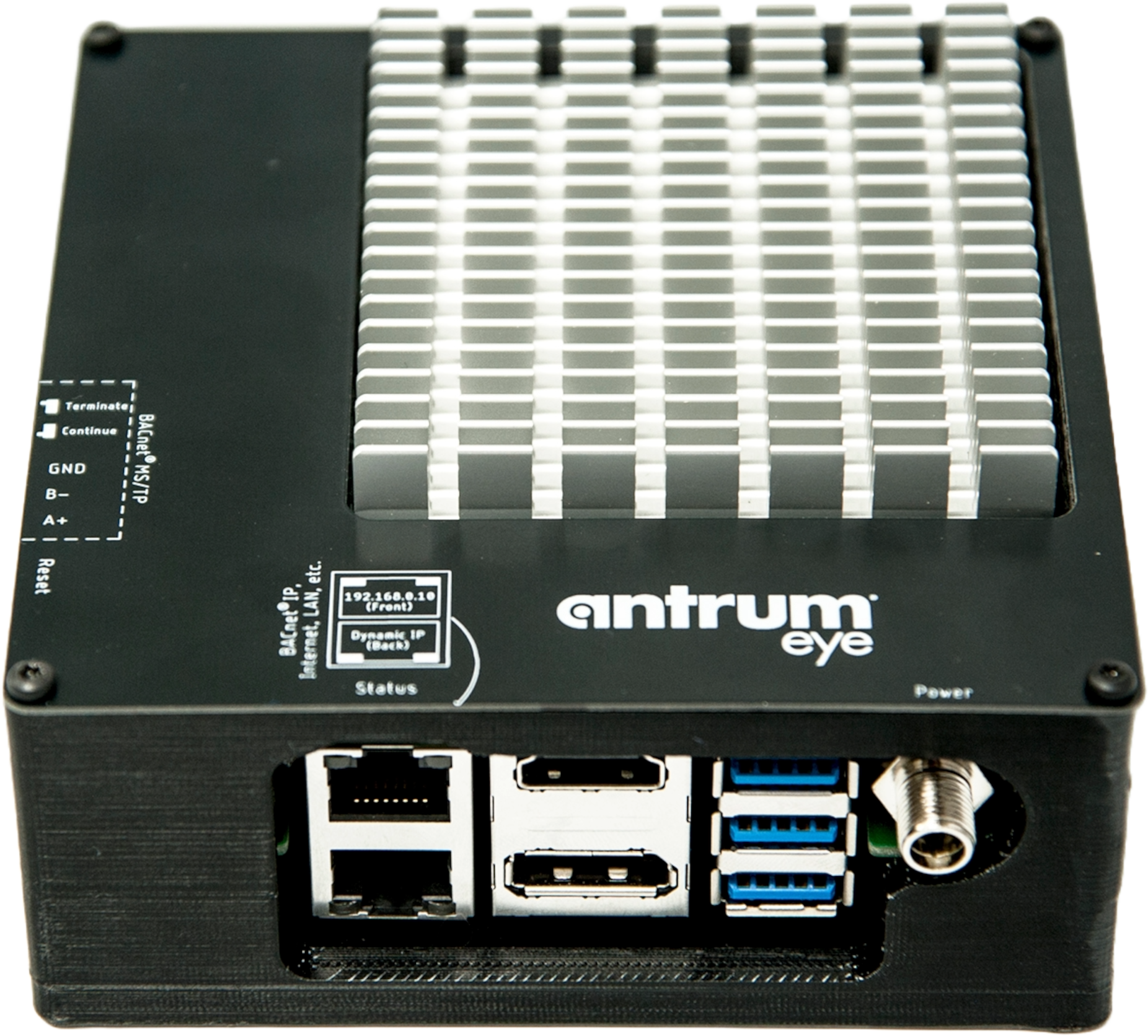
AntrumEYE is powered by an industrial-grade computer designed for advanced IoT applications. The system comes with a dedicated power adapter for quick setup — simply plug it into a wall outlet, connect over BACnet, and you’re ready to go. Once integrated, AntrumEYE automatically begins collecting ventilation and energy data, which can be easily viewed through our intuitive, user-friendly dashboards.
## Ventilation Data at your fingertips

AntrumEYE® is a ventilation dashboard that goes beyond AntrumX® data—pulling from both the centralized sensing system, when applicable, and the building management system (BMS) to deliver a more comprehensive view of building ventilation performance. Designed with safety and energy efficiency in mind, AntrumEYE highlights key metrics such as air change rates, kWh savings, sash positions, and air quality trends. The result is actionable insight that supports a safer, more sustainable built environment.

![dashboard-sqaure](https://antrum.com/hs-fs/hubfs/Website%20Filestore/Technology%20-%20antrumEYE/dashboard-sqaure.png?width=1916&height=1916&name=dashboard-sqaure.png)

### Overview Dashboard

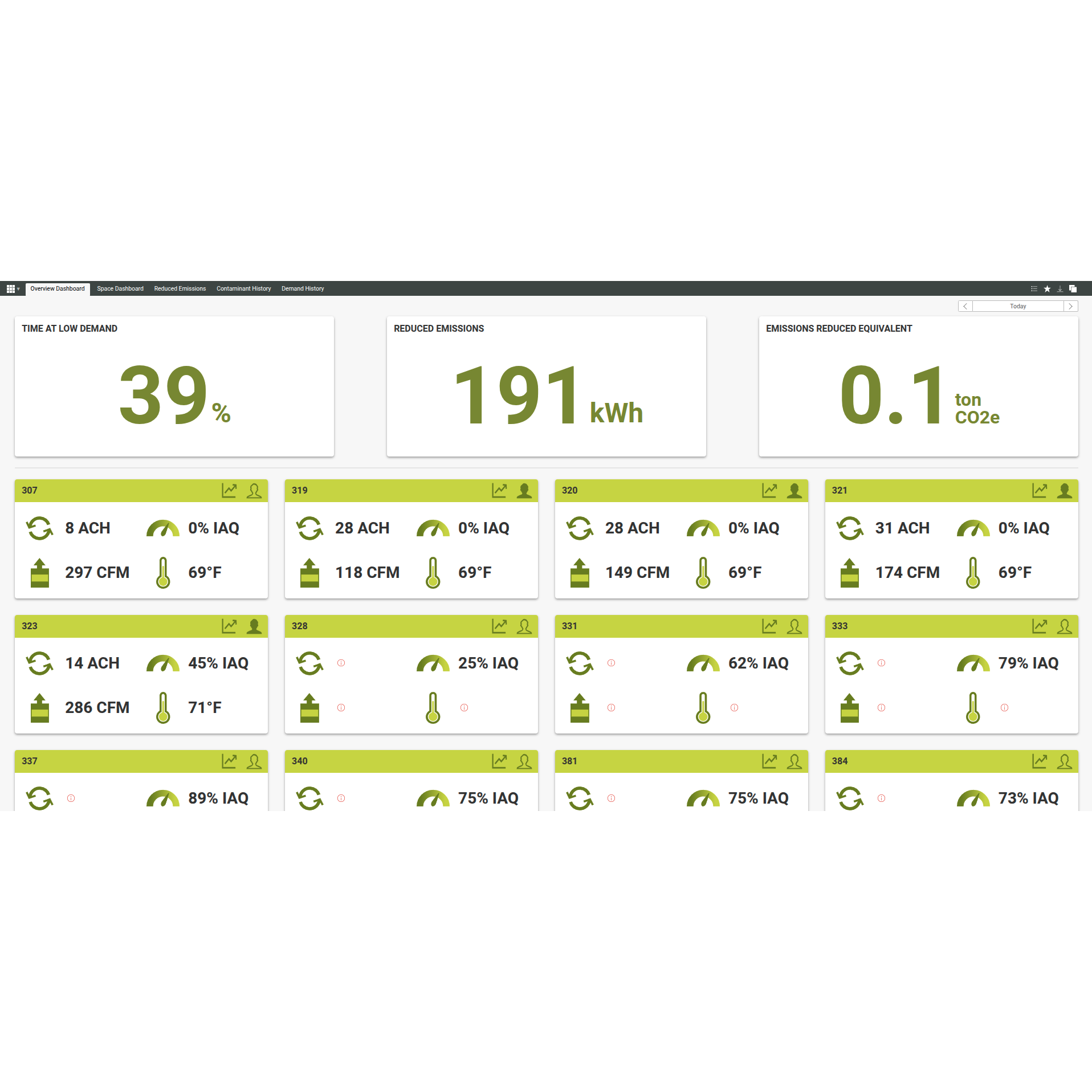
The overview dashboard has two main components: historical demand and current space summaries. Historical demand shows system trends over the selected timeframe, while current space summaries display the real-time status of each monitored space.

![space-dashboard-square](https://antrum.com/hs-fs/hubfs/Website%20Filestore/Technology%20-%20antrumEYE/space-dashboard-square.png?width=1920&height=1920&name=space-dashboard-square.png)

### Space Dashboard

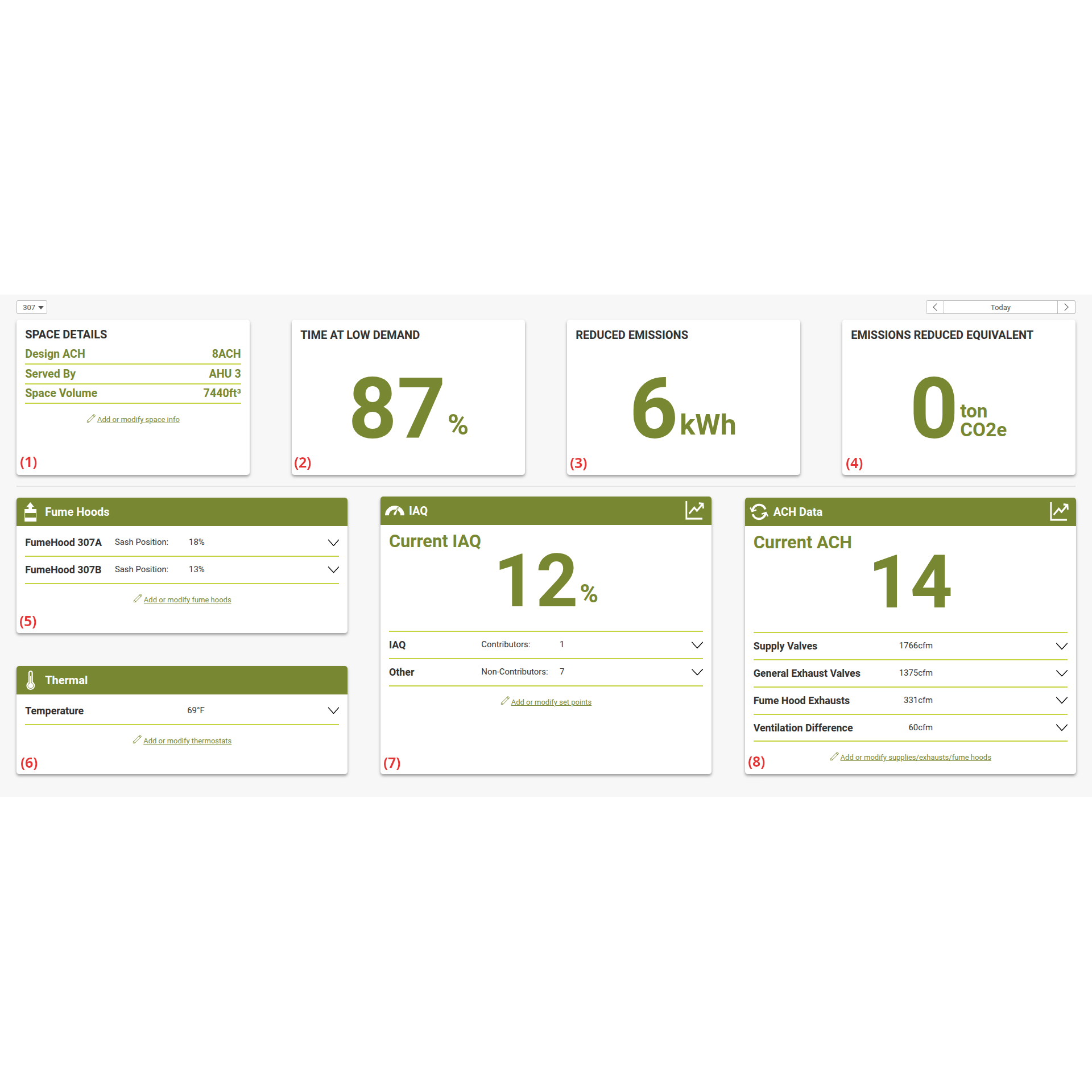
The space dashboard shows historical demand, current state, and key details like volume and design conditions. Historical demand highlights trends over the selected timeframe, while each detail card provides real-time ventilation data for the space.

![reduced-emissions-dashboard-square](https://antrum.com/hs-fs/hubfs/Website%20Filestore/Technology%20-%20antrumEYE/reduced-emissions-dashboard-square.png?width=1919&height=1919&name=reduced-emissions-dashboard-square.png)

### Energy Dashboard

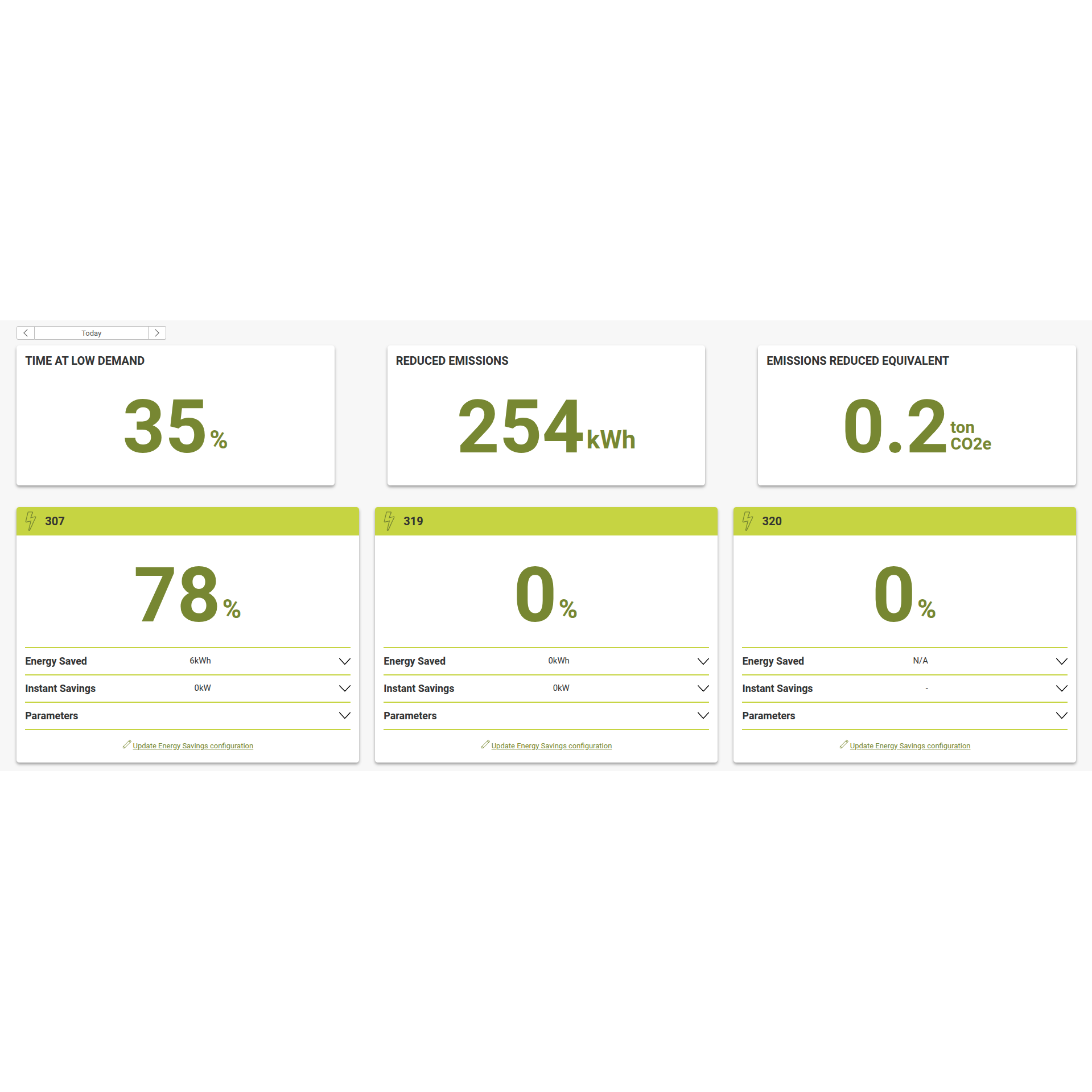
 The reduced emissions dashboard has two components: historical demand and space summary cards. Both show energy saved when operating below design ACH, but the space summary cards provide results by monitored space distinguishing between ventilation and conditioning savings.

## Easy to integrate

To integrate AntrumEYE, complete a space questionnaire to auto-generate a BACnet form, then import it into AntrumEYE.

Configure BACnet integration by [connecting to AntrumEYE](https://antrum.com/resources/experience#connection) and using the [BACnet tab](https://antrum.com/resources/experience?hsLang=en#bacnet) of the System Config. app.

![form-filled](https://antrum.com/hs-fs/hubfs/Website%20Filestore/Resources%20-%20Experience/Misc%20-%20Importing%20BACnet%20Points/Images/form-filled.png?width=1372&height=225&name=form-filled.png)

[![Antrum a\_mark\_logo\_2color white](https://antrum.com/hubfs/Antrum%20a_mark_logo_2color%20white.svg)](https://antrum.com?hsLang=en)

- <https://www.facebook.com/antrumiaq>
- <https://www.linkedin.com/company/antrumx/>

- [TECHNOLOGY](https://antrum.com/antrumx)
- [CONTACT](https://antrum.com/contact)

© 2026 Antrum. All rights reserved. [Privacy Policy](https://antrum.com/privacy-policy?hsLang=en)